
👨💻 about me home CV/Resume News 🖊️ Contact Codeberg Github LinkedIn 🏆 Best of LuaX (tools) pub bang ypp panda lsvg ldc req yreq Fizzbuzz Calculadoira TPG picfg Belenos (intro) dnsfilter badges 🔀 Git Repos
Made in Europe
PP is a text preprocessor designed for Pandoc (and more generally Markdown and reStructuredText).
The PP package used to contain three preprocessors for Pandoc.
I started using Markdown and Pandoc with GPP. Then I wrote DPP to embed diagrams in Markdown documents. And finally PP which merges the functionalities of GPP and DPP.
GPP and DPP are no longer
included in PP as pp
can now be used standalone. dpp and gpp can be
found in the legacy DPP repository.
pp now implements:
Their is no plan to support PP from now on. PP is meant to be replaced by a combination of:
ypp and Panda are written in Lua and are way easier to deploy.
PP is an Open source software. Anybody can contribute on GitHub to:
Compilation:
make.PP is written in Haskell and is built with Stack. On
MacOS, running make requires the GNU version of
tar which can be installed with
brew install gnu-tar.
Docker:
A Linux docker made by Joshua Dotson is available here:
Installation:
make install to copy pp in
~/.local/bin.pp (pp.exe on Windows) wherever
you want.pp requires (optionally) Graphviz, blockdiag, Asymptote, R and Java (PlantUML and ditaa are embedded in
pp).
Precompiled binaries:
The recommended way to get PP binaries is to compile them from the sources. Anyway if you have no Haskell compiler, you can try some precompiled binaries.
Latest Linux and Windows binaries:
Older version archive:
User contributed Mac OS binaries (outdated):
pp is a simple preprocessor written in Haskell. It’s
mainly designed for Pandoc but may be used as a generic preprocessor. It
is not intended to be as powerful as GPP, for instance, but is a simple
implementation for my own needs, as well as an opportunity to play with
Haskell.
pp takes strings as input and incrementally builds an
environment which is a lookup table containing variables and various
other information. Built-in macros are Haskell functions that takes
arguments (strings) and the current environment and build a new
environment in the IO monad. User defined macros are simple definitions,
arguments are numbered 1 to N.
pp emits the preprocessed document on the standard
output. Inputs are listed on the command line and concatenated, the
standard input is used when no input is specified.
pp executes arguments in the same order as the command
line. It starts with an initial environment containing:
lang variable containing the current langage
(currently only French (fr), Italian (it),
Spanish (es) and English (en) are
supported)format variable containing the current output format
(html, pdf, odt,
epub or mobi)dialect variable containing the current dialect
(md or rst)The dialect is used to format links and images in the output documents. Currently only Markdown and reStructuredText are supported.
If no input file is specified, pp preprocesses the
standard input.
The command line arguments are intentionally very basic. The user can define and undefine variables and list input files.
-v
displays the current version and exits.
-h
displays some help and exits.
-help
displays a longer help and exits.
-userhelp
displays a longer help for user macros only and exits.
-DSYMBOL[=VALUE] or
-D SYMBOL[=VALUE]
adds the symbol SYMBOL to the current environment and
associates it to the optional value VALUE. If no value is
provided, the symbol is simply defined with an empty value.
-USYMBOL or
-U SYMBOL
removes the symbol SYMBOL from the current environment.
-img=PREFIX or
-img PREFIX
changes the prefix of the images output path.
-import=FILE or
-import FILE
preprocessed FILE but discards its output. It only keeps
macro definitions and other side effects.
-M TARGET or
-M=TARGET
tracks dependencies and outputs a make rule listing the dependencies.
The target name is necessary since it can not be infered by
pp. This option only lists files that are imported,
included and used with mdate and
csvmacros.
-plantuml=FILE or
-plantuml FILE
use FILE instead of the embedded plantuml.jar file.
-ditaa=FILE or
-ditaa FILE
use FILE instead of the embedded ditaa.jar file.
-<macro>[=<arg>]
calls a builtin macro with an optional argument (see
pp -help for the full macro list). Some macros may prevent
pp from reading stdin when no file is given on the command line
(langs, formats, dialects,
os, arch, macros,
usermacros).
Other arguments are filenames.
Files are read and preprocessed using the current state of the
environment. The special filename “-” can be used to
preprocess the standard input.
Built-in macros are hard coded in pp and can not be
redefined. User defined macros are simple text substitutions that may
have any number of parameters (named !1 to
!n). User macros can be (re)defined on the command line or
in the documents.
Macro names are:
!my_macro and
!My_Macro are different macros)a-zA-Z0-9_)User macros starting with _ are not listed in macros
lists and help texts.
To get the value of a variable you just have to write its name after
a ‘!’. Macros can be given arguments. Each argument is
enclosed in parenthesis, curly braces or square brackets. For instance,
the macro foo with two arguments can be called as
!foo(x)(y), !foo{x}{y} or even
!foo[x][y]. Mixing brackets, braces and parenthesis within
a single macro is not allowed: all parameters must be enclosed within
the same type of delimiters. This helps ending a list of arguments in
some edge cases:
!macro(x)(y)

[link]: foo bar

Here, [link] is not parsed as a third parameter of !macro
Arguments are stripped. Removing leading and trailing spaces helps preserving line structure in the document.
The last arguments can be enclosed between lines of tildas or backquotes (of the same length) instead of parenthesis, brackets or braces and. This is useful for literate programming, diagrams or scripts (see examples). Code block arguments are not stripped: spaces and blank lines are preserved.
Arguments can be on separate lines but must not be separated by blank lines.
You can choose the syntax that works better with your favorite editor and syntax colorization.
For most of the macros, arguments are preprocessed before executing
the macro. Macros results are not preprocessed (unless used as a
parameter of an outer macro). The include macro is an
exception: its output is also preprocessed. The rawinclude
macro can include a file without preprocessing it.
define,
def
!def[ine](SYMBOL)[[(DOC)](VALUE)] adds the symbol
SYMBOL to the current environment and associate it with the
optional value VALUE. Arguments are denoted by
!1 … !n in VALUE. If
DOC is given it is used to document the macro (see the
-help option).
undefine,
undef
!undef[ine](SYMBOL) removes the symbol SYMBOL
from the current environment.
defined
!defined(SYMBOL) returns 1 if SYMBOL is
defined, 0 otherwise.
rawdef
!rawdef(X) returns the raw (unevaluated) definition of
X.
ifdef
!ifdef(SYMBOL)(TEXT_IF_DEFINED)[(TEXT_IF_NOT_DEFINED)]
returns TEXT_IF_DEFINED if SYMBOL is defined
or TEXT_IF_NOT_DEFINED if it is not defined.
ifndef
!ifndef(SYMBOL)(TEXT_IF_NOT_DEFINED)[(TEXT_IF_DEFINED)]
returns TEXT_IF_NOT_DEFINED if SYMBOL is not
defined or TEXT_IF_DEFINED if it is defined.
ifeq
!ifeq(X)(Y)(TEXT_IF_EQUAL)[(TEXT_IF_DIFFERENT)] returns
TEXT_IF_EQUAL if X and Y are
equal or TEXT_IF_DIFFERENT if X and
Y are different. Two pieces of text are equal if all
non-space characters are the same.
ifne
!ifne(X)(Y)(TEXT_IF_DIFFERENT)[(TEXT_IF_EQUAL)] returns
TEXT_IF_DIFFERENT if X and Y are
different or TEXT_IF_EQUAL if X and
Y are equal.
if
!if(EXPR)(TEXT_IF_EXPR_IS_TRUE)[(TEXT_IF_EXPR_IS_FALSE)]
returns TEXT_IF_EXPR_IS_TRUE if EXPR is true
or TEXT_IF_EXPR_IS_FALSE if EXPR is false.
eval
!eval(EXPR) evaluatesEXPR`.
info
!info(MESSAGE) printsMESSAGE` on stderr.
warning,
warn
!warn[ing](MESSAGE) printsMESSAGE` on stderr.
error
!error[(CODE)](MESSAGE) printsMESSAGEon stderr and exits with error codeCODE`.
exit
!exit(CODE) exits with error codeCODE`.
import
!import(FILENAME) works as !include(FILENAME)
but returns nothing. This is useful to import macro definitions.
include,
inc
!inc[lude](FILENAME) preprocesses and returns the content
of the file named FILENAME and includes it in the current
document. If the file path is relative it is searched first in the
directory of the current file then in the directory of the main
file.
raw
!raw(TEXT) returns TEXT without any
preprocessing.
rawinclude,
rawinc
!rawinc[lude](FILE) returns the content of
FILE without any preprocessing.
comment
!comment(TEXT) considers TEXT as well as any
additional parameters as comment. Nothing is preprocessed or
returned.
quiet
!quiet(TEXT) quietly preprocesses TEXT and
returns nothing. Only the side effects (e.g. macro definitions) are kept
in the environment.
pp
!pp(TEXT) preprocesses and return TEXT. This
macro is useful to preprocess the output of script macros for instance
(!sh, !python, …).
mustache
!mustache(JSON/YAML file)(TEMPLATE) preprocesses
TEMPLATE with mustache, using a
JSON/YAML file.
mdate
!mdate(FILES) returns the modification date of the most
recent file.
main
!main returns the name of the main file (given on the
command line).
file
!file returns the name of the current file.
root
!root returns the directory name of the main file.
cwd
!cwd returns the directory name of the current file.
lang
!lang returns the current language.
langs
!langs lists the known languages (en, fr, it, es).
en
!en(TEXT) returns TEXT if the current language
is en.
fr
!fr(TEXT) returns TEXT if the current language
is fr.
it
!it(TEXT) returns TEXT if the current language
is it.
es
!es(TEXT) returns TEXT if the current language
is es.
format
!format returns the current output format.
formats
!formats lists the known formats (html, pdf, odf, epub,
mobi).
html
!html(TEXT) returns TEXT if the current format
is html.
pdf
!pdf(TEXT) returns TEXT if the current format
is pdf.
odf
!odf(TEXT) returns TEXT if the current format
is odf.
epub
!epub(TEXT) returns TEXT if the current format
is epub.
mobi
!mobi(TEXT) returns TEXT if the current format
is mobi.
dialect
!dialect returns the current output dialect.
dialects
!dialects lists the kown output dialects (md, rst).
md
!md(TEXT) returns TEXT if the current dialect
is md.
rst
!rst(TEXT) returns TEXT if the current dialect
is rst.
env
!env(VARNAME) preprocesses and returns the value of the
process environment variable VARNAME.
os
!os returns the OS name (e.g. linux on Linux,
darwin on MacOS, windows on Windows).
arch
!arch returns the machine architecture
(e.g. x86_64, i386, …).
add
!add(VARNAME)[(INCREMENT)] computes
VARNAME+INCREMENT and stores the result to
VARNAME. The default value of the increment is 1.
append
!append(VARNAME)[(TEXT)] appends TEXT to
!VARNAME and stores the result to VARNAME.
exec
!exec(COMMAND) executes a shell command with the default
shell (sh or cmd according to the OS).
rawexec
!rawexec is deprecated. See exec.
sh
!sh(CMD) executes CMD in a sh
shell.
bash
!bash(CMD) executes CMD in a bash
shell.
zsh
!zsh(CMD) executes CMD in a zsh
shell.
fish
!fish(CMD) executes CMD in a fish
shell.
cmd
!cmd(CMD) executes CMD in a Windows shell
(cmd.exe).
bat
!bat is deprecated. See cmd.
python
!python(CMD) executes CMD with the default
Python interpretor.
python2
!python2(CMD) executes CMD with Python 2.
python3
!python3(CMD) executes CMD with Python 3.
lua
!lua(CMD) executes CMD with Lua.
haskell
!haskell(CMD) executes CMD as a Haskell script
with runhaskell.
stack
!stack(CMD) executes CMD as a Haskell script
with stack.
Rscript
!Rscript(CMD) executes CMD as a R script with
Rscript.
powershell
!cmd(CMD) executes CMD in a Windows shell
(Powershell).
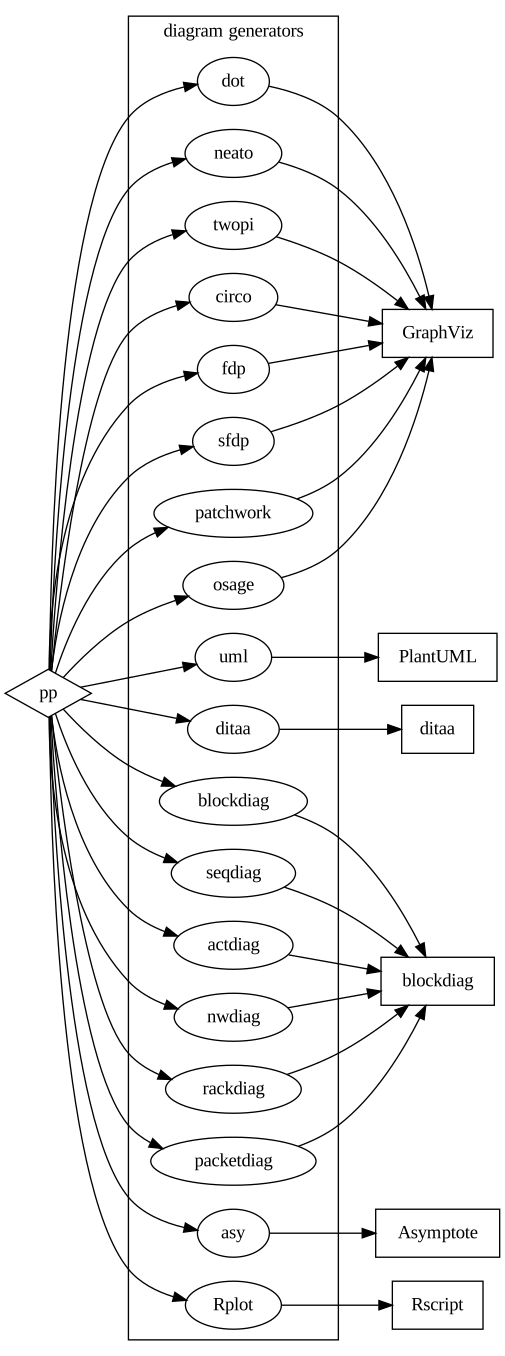
dot
!dot(IMAGE)[(LEGEND)](GRAPH DESCRIPTION) renders a dot
image with Graphviz.
neato
!neato(IMAGE)[(LEGEND)](GRAPH DESCRIPTION) renders a neato
image with Graphviz.
twopi
!twopi(IMAGE)[(LEGEND)](GRAPH DESCRIPTION) renders a twopi
image with Graphviz.
circo
!circo(IMAGE)[(LEGEND)](GRAPH DESCRIPTION) renders a circo
image with Graphviz.
fdp
!fdp(IMAGE)[(LEGEND)](GRAPH DESCRIPTION) renders a fdp
image with Graphviz.
sfdp
!sfdp(IMAGE)[(LEGEND)](GRAPH DESCRIPTION) renders a sfdp
image with Graphviz.
patchwork
!patchwork(IMAGE)[(LEGEND)](GRAPH DESCRIPTION) renders a
patchwork image with Graphviz.
osage
!osage(IMAGE)[(LEGEND)](GRAPH DESCRIPTION) renders a osage
image with Graphviz.
uml
!uml(IMAGE)[(LEGEND)](GRAPH DESCRIPTION) renders a uml
image with PlantUML.
ditaa
!ditaa(IMAGE)[(LEGEND)](GRAPH DESCRIPTION) renders a ditaa
image with Ditaa.
blockdiag
!blockdiag(IMAGE)[(LEGEND)](GRAPH DESCRIPTION) renders a
blockdiag image with BlockDiag.
seqdiag
!seqdiag(IMAGE)[(LEGEND)](GRAPH DESCRIPTION) renders a
seqdiag image with BlockDiag.
actdiag
!actdiag(IMAGE)[(LEGEND)](GRAPH DESCRIPTION) renders a
actdiag image with BlockDiag.
nwdiag
!nwdiag(IMAGE)[(LEGEND)](GRAPH DESCRIPTION) renders a
nwdiag image with BlockDiag.
rackdiag
!rackdiag(IMAGE)[(LEGEND)](GRAPH DESCRIPTION) renders a
rackdiag image with BlockDiag.
packetdiag
!packetdiag(IMAGE)[(LEGEND)](GRAPH DESCRIPTION) renders a
packetdiag image with BlockDiag.
asy
!asy(IMAGE)[(LEGEND)](GRAPH DESCRIPTION) renders a asy
image with Asymptote.
Rplot
!Rplot(IMAGE)[(LEGEND)](GRAPH DESCRIPTION) renders a Rplot
image with R.
literate,
lit
!lit[erate](FILENAME)[(LANG)][(CONTENT)] appends
CONTENT to the file FILENAME. If
FILENAME starts with @ it’s a macro, not a
file. The output is highlighted using the programming language
LANGUAGE. The list of possible languages is given by
pandoc --list-highlight-languages. Files are actually
written when all the documents have been successfully preprocessed.
Macros are expanded when the files are written. This macro provides
basic literate programming features. If LANG is not given,
pp uses the previously defined language for the same file or macro or a
default language according to its name. If CONTENTis not
given, pp returns the current content of FILENAME.
flushliterate,
flushlit
!flushlit[erate] writes files built with !lit
before reaching the end of the document. This macro is automatically
executed before any script execution or file inclusion with
!src.
source,
src
!source(FILENAME)[(LANG)] or
!src(FILENAME)[(LANG)] formats an existing source file in a
colorized code block.
codeblock
!codeblock(LENGTH)[(CHAR)] sets the default line separator
for code blocks. The default value is a 70 tilda row
(!codeclock(70)(~)).
indent
!indent[(N)](BLOCK) indents each line of a block with
N spaces. The default value of N is 4
spaces.
csv
!csv(FILENAME)[(HEADER)] converts a CSV file to a Markdown
or reStructuredText table. HEADER defines the header of the
table, fields are separated by pipes (|). If
HEADER is not defined, the first line of the file is used
as the header of the table.
macrochars
!macrochars(CHARS) defines the chars used to call a macro.
The default value is "!". Any non space character can start
a macro call (e.g. after !macrochars(!\) both
!foo and \foo are valid macro calls.
macroargs
!macroargs(CHARS) defines the chars used to separate macro
arguments. The default value is "(){}[]" (e.g. after
!macroargs(()«») both !foo(...) and
!foo«...» are valid macro calls).
macroblockargs
!macroblockargs(CHARS) defines the chars used to separate
macro block arguments. The default value is "~`".
literatemacrochars
!literatemacrochars(CHARS) defines the chars used to
identify literate programming macros. The default value is
"@". Any non space character can start a literate
programming macro (e.g. after !literatemacrochars(@&)
both @foo and &foo are valid macro
calls.
macros
!macros lists the builtin macros.
usermacros
!usermacros lists the user macros.
help
!help prints built-in macro help.
userhelp
!userhelp prints user macro help.
The !if and !eval macros take an expression
and evaluate it. Expressions are made of:
"...")+, -, *,
/)!, not,
&&, and, ||,
or, xor)==, /=,
!=, <, <=,
>, >=)Boolean values are coded as integers or string (0 and
"" are false, other values are true).
Macros can be called in expressions. They are preprocessed before evaluating the expression.
e.g.:
!if( !defined(FOO) or !BAR == 42 ) (say something)The main program just prints some messages:
!lit(main.c)(C)
~~~~~~~~~~~~~~~~~~~~
@includes
void main()
{
@messages
}
~~~~~~~~~~~~~~~~~~~~
First we need to be able to print messages:
!lit(@includes)(C)
~~~~~~~~~~~~~~~~~~~~
#include <stdio.h>
~~~~~~~~~~~~~~~~~~~~
The program must first say “Hello” :
!lit(@messages)(C)
~~~~~~~~~~~~~~~~~~~~
    puts("Hello...\n");
~~~~~~~~~~~~~~~~~~~~
And also finally “Goodbye”:
!lit(@messages)
~~~~~~~~~~~~~~~~~~~~
    puts("Goodbye.");
~~~~~~~~~~~~~~~~~~~~Diagrams are written in code blocks as argument of a diagram macro. The first line contains the macro:
svg if no extension is provided
(unless for ditaa diagrams which support png only)png, svg and
‘pdf’ (PDF support is partial and may not work with PlantUML)Block delimiters are made of three or more tilda or back quotes, at the beginning of the line (no space and no tab). The end delimiter must at least as long as the beginning delimiter.
!dot(path/imagename)(optional legend)
~~~~~~~~~~~~~~~~~~~~~~~~~~~~~~~~~~~~~~~~~~~
    graph {
        "source code of the diagram"
    }
~~~~~~~~~~~~~~~~~~~~~~~~~~~~~~~~~~~~~~~~~~~
This extremely meaningful diagram is rendered as
path/imagename.svg and looks like:
The image file extension can be .svg, .png
or pdf. SVG is the default format if no
extension is provided (unless for ditaa diagrams).
!dot(path/imagename.svg)(optional legend) or
!dot(path/imagename)(optional legend) are rendered as
path/imagename.svg.
!dot(path/imagename.png)(optional legend) is rendered as
path/imagename.png.
!dot(path/imagename.pdf)(optional legend) is rendered as
path/imagename.pdf (if supported).
The image link in the output markdown document may have to be
different than the actual path in the file system. This happens when
then .md or .html files are not generated in
the same path than the source document. Brackets can be used to specify
the part of the path that belongs to the generated image but not to the
link in the output document. For instance a diagram declared as:
!dot([mybuildpath/]img/diag42)...will be actually generated in:
mybuildpath/img/diag42.pngand the link in the output document will be:
img/diag42.pngFor instance, if you use Pandoc to generate HTML documents with diagrams in a different directory, there are two possibilities:
--self-contained), i.e. the CSS and images are stored
inside the document:
outputpath/img/diag42[outputpath/]img/diag42Pandoc also accepts additional attributes on images
(link_attributes extension). These attributes can be added
between curly brackets to the first argument. e.g.:
!dot(image.png { width=50 % })(caption)(...)will generate the following link in the markdown output:
{ width=50 % }The diagram generator can be:
pp will not create any directory, the path where the
image is written must already exist.
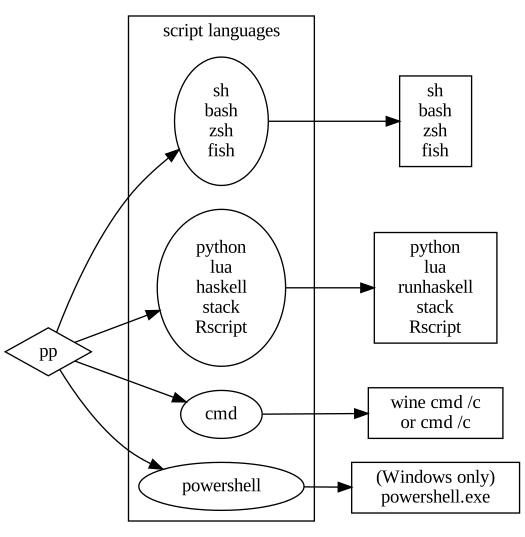
Scripts are also written in code blocks as arguments of a macro.
!bash
~~~~~~~~~~~~~~~~~~~~~~~~~~~~~~~~~~~~~~~~~~~
echo Hello World!
~~~~~~~~~~~~~~~~~~~~~~~~~~~~~~~~~~~~~~~~~~~
With no surprise, this script generates:
Hello World!The script language macro can be:
sh, bash, zsh,
fish or any other shell with sh and a shebang
headerpythonluahaskell (or stack)Rscriptcmd (DOS/Windows batch language)powershell (Windows only)pp will create a temporary script before calling the
associated interpretor.
The source code of this document contains some diagrams.
Here are some simple examples. For further details about diagrams’ syntax, please read the documentation of GraphViz, PlantUML, ditaa and blockdiag.
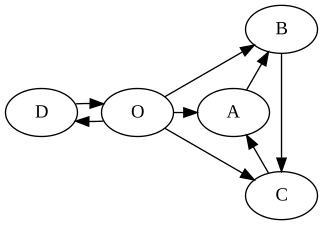
GraphViz is executed when one of
these keywords is used: dot, neato,
twopi, circo, fdp,
sfdp, patchwork, osage
!twopi(doc/img/pp-graphviz-example)(This is just a GraphViz diagram example)
~~~~~~~~~~~~~~~~~~~~~~~~~~~~~~~~~~~~~~~~~~~
digraph {
    O -> A
    O -> B
    O -> C
    O -> D
    D -> O
    A -> B
    B -> C
    C -> A
}
~~~~~~~~~~~~~~~~~~~~~~~~~~~~~~~~~~~~~~~~~~~
twopi is the kind of graph (possible graph types:
dot, neato, twopi,
circo, fdp, sfdp,
patchwork).doc/img/pp-graphviz-example is the name of the image.
pp will generate
doc/img/pp-graphviz-example.dot and
doc/img/pp-graphviz-example.png.doc/img/pp-graphviz-example.dot before running Graphviz.-img=prefix,
prefix is added at the beginning of the image path.Once generated the graph looks like:
GraphViz must be installed.
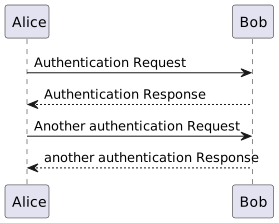
PlantUML is executed
when the keyword uml is used. The lines
@startuml and @enduml required by PlantUML are added by
pp.
!uml(pp-plantuml-example)(This is just a PlantUML diagram example)
~~~~~~~~~~~~~~~~~~~~~~~~~~~~~~~~~~~~~~~~~~~
Alice -> Bob: Authentication Request
Bob --> Alice: Authentication Response
Alice -> Bob: Another authentication Request
Alice <-- Bob: another authentication Response
~~~~~~~~~~~~~~~~~~~~~~~~~~~~~~~~~~~~~~~~~~~
Once generated the graph looks like:
PlantUML is written in
Java and is embedded in pp. Java must be installed.
ditaa is executed when
the keyword ditaa is used.
!ditaa(pp-ditaa-example)(This is just a Ditaa diagram example)
~~~~~~~~~~~~~~~~~~~~~~~~~~~~~~~~~~~~~~~~~~~
    +--------+   +-------+    +-------+
    |        | --+ ditaa +--> |       |
    |  Text  |   +-------+    |diagram|
    |Document|   |!magic!|    |       |
    |     {d}|   |       |    |       |
    +---+----+   +-------+    +-------+
        :                         ^
        |       Lots of work      |
        +-------------------------+
~~~~~~~~~~~~~~~~~~~~~~~~~~~~~~~~~~~~~~~~~~~
Once generated the graph looks like:
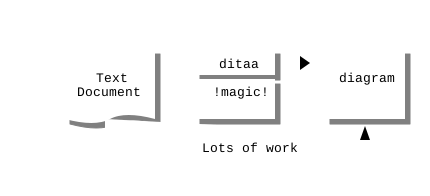
ditaa is written in
Java and is embedded in pp. Java must be installed.
blockdiag is executed when one of
these keywords is used: blockdiag, seqdiag,
actdiag, nwdiag, rackdiag,
packetdiag
!blockdiag(pp-blockdiag-example)(This is just a blockdiag diagram example)
~~~~~~~~~~~~~~~~~~~~~~~~~~~~~~~~~~~~~~~~~~~
    A -> B -> C -> D
    A -> E -> F -> D
    F -> F
    D -> A
~~~~~~~~~~~~~~~~~~~~~~~~~~~~~~~~~~~~~~~~~~~
Once generated the graph looks like:
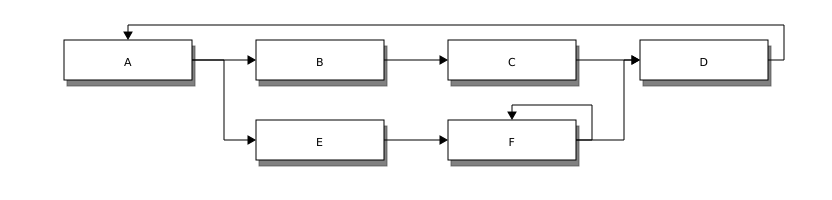
blockdiag
(blockdiag, seqdiag, actdiag and
nwdiag) must be installed.
Asymptote is executed
when the keyword asy is used.
!asy(pp-asy-example)
    (This is just an Asymptote example from <http://asy.marris.fr/asymptote/Sciences_physiques/index.html>)
~~~~~~~~~~~~~~~~~~~~~~~~~~~~~~~~~~~~~~~~~~~
import geometry;
size(7.5cm,0);

// Affichage du repère par défaut (O,vec{i},vec_{j})
show(defaultcoordsys);

real a=5, b=4, theta=-27, poids=3;
ellipse el = ellipse(origin, a, b);
arc     ar = arc(el,(0,-b),(a,0),CCW);
path p = (0,-b-1)--ar--(a+1,0)--(a+1,-b-1)--cycle;
point pO = (0,0), pM=angpoint(ar,90+theta);
abscissa abscM = nodabscissa(el,pM);
real     timeM = abscM.x;
vector utangM = -dir(el,timeM),
    unormM = rotate(90)*utangM,
    vpoids=(0,-poids),
    vreactionN = -dot(vpoids,unormM)*unormM,
    vfrottement = -dot(vpoids,utangM)*utangM;

filldraw(p,lightgray,blue);
draw(pO--pM,dashed);
markangle("$\theta$",1.5cm,pM,origin,(1,0));

// Affichage d'un nouveau repère (M,vec{u_{\theta}},vec_{u_{r}})
coordsys R=cartesiansystem(pM,i=utangM,j=unormM);
show("$M$", "$\vec{u_{\theta}}$", "$\vec{u_{r}}$", R, xpen=invisible);

// Affichage des trois vecteurs dans le repère R
point RpM=changecoordsys(R, pM);
show(Label("$\vec{f}$",EndPoint),RpM+vfrottement);
show(Label("$\vec{R}$",EndPoint),RpM+vreactionN);
show(Label("$\vec{P}$",EndPoint),RpM+vpoids);
~~~~~~~~~~~~~~~~~~~~~~~~~~~~~~~~~~~~~~~~~~~
Once generated the figure looks like:
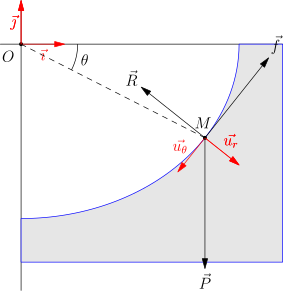
Note: Asymptote handles transparency in PDF format
only, which is converted to PNG by pp. If you need
transparency, you must use the .png or pdf
format (PNG images are generated by converting the PDF output of
Asymptote). If you need scalable images, you must use the
.svg format, which is the default format for Asymptote
diagrams.
R is executed when the
keyword Rplot is used.
!Rplot(rplot-test)(This is just an R plot example)
~~~~~~~~~~~~~~~~~~~~~~~~~~~~~~~~~~~~~~~~~~~~~~~~~~~~~~~~~~~~~~~~~~~~~~~~
plot(pressure)
~~~~~~~~~~~~~~~~~~~~~~~~~~~~~~~~~~~~~~~~~~~~~~~~~~~~~~~~~~~~~~~~~~~~~~~~
Once generated the image looks like:
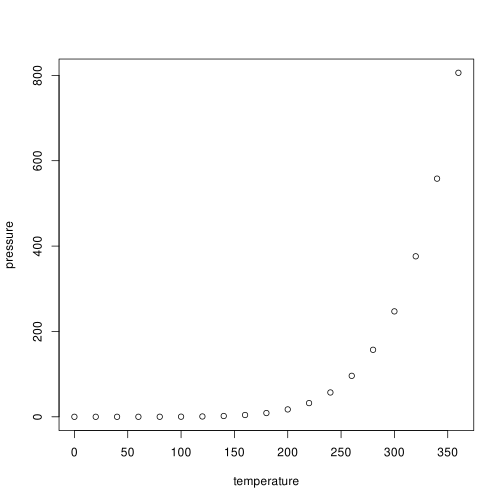
Bash is executed
when the keyword bash is used.
!bash
~~~~~~~~~~~~~~~~~~~~~~~~~~~~~~~~~~~~~~~~~~~
echo "Hi, I'm $SHELL $BASH_VERSION"
RANDOM=42 # seed
echo "Here are a few random numbers: $RANDOM, $RANDOM, $RANDOM"
~~~~~~~~~~~~~~~~~~~~~~~~~~~~~~~~~~~~~~~~~~~
This script outputs:
Hi, I'm bash 5.2.15(1)-release
Here are a few random numbers: 17772, 26794, 1435Note: the keyword sh executes
sh which is generally a link to bash.
Windows’ command-line
interpreter is executed when the keyword cmd is
used.
!cmd
~~~~~~~~~~~~~~~~~~~~~~~~~~~~~~~~~~~~~~~~~~~
echo Hi, I'm %COMSPEC%
ver
if "%WINELOADER%%WINELOADERNOEXEC%%WINEDEBUG%" == "" (
    echo This script is run from wine under Linux
) else (
    echo This script is run from a real Windows
)
~~~~~~~~~~~~~~~~~~~~~~~~~~~~~~~~~~~~~~~~~~~
This script outputs:
Hi, I'm C:\windows\system32\cmd.exe

Microsoft Windows 6.1.7601
This script is run from wine under Linux
Python is executed when the
keyword python is used.
!python
~~~~~~~~~~~~~~~~~~~~~~~~~~~~~~~~~~~~~~~~~~~
import sys
import random

if __name__ == "__main__":
    print("Hi, I'm Python %s"%sys.version)
    random.seed(42)
    randoms = [random.randint(0, 1000) for i in range(3)]
    print("Here are a few random numbers: %s"%(", ".join(map(str, randoms))))
~~~~~~~~~~~~~~~~~~~~~~~~~~~~~~~~~~~~~~~~~~~
This script outputs:
Hi, I'm Python 3.11.1 (main, Dec  7 2022, 00:00:00) [GCC 12.2.1 20221121 (Red Hat 12.2.1-4)]
Here are a few random numbers: 654, 114, 25
Lua is executed when the keyword
lua is used.
!lua
~~~~~
print("Hi, I'm ".._VERSION)
math.randomseed(42)
t = {}
for i = 1, 3 do table.insert(t, math.random(0, 999)) end
print("Here are a few random numbers: "..table.concat(t, ", "))
~~~~~
This script outputs:
Hi, I'm Lua 5.4
Here are a few random numbers: 741, 49, 331
Haskell is executed when the
keyword haskell is used.
!haskell
~~~~~~~~~~~~~~~~~~~~~~~~~~~~~~~~~~~~~~~~~~~
import System.Info
import Data.Version
import Data.List

primes = filterPrime [2..]
    where filterPrime (p:xs) =
            p : filterPrime [x | x <- xs, x `mod` p /= 0]

version = showVersion compilerVersion

main = do
    putStrLn $ "Hi, I'm Haskell " ++ version
    putStrLn $ "The first 10 prime numbers are: " ++
                intercalate " " (map show (take 10 primes))
~~~~~~~~~~~~~~~~~~~~~~~~~~~~~~~~~~~~~~~~~~~
This script outputs:
Hi, I'm Haskell 9.2
The first 10 prime numbers are: 2 3 5 7 11 13 17 19 23 29Haskell is also executed when
the keyword stack is used. In this case stack meta data
must be added at the beginning of the script.
!stack
~~~~~~~~~~~~~~~~~~~~~~~~~~~~~~~~~~~~~~~~~~~
{- stack script --resolver lts-20.6 --package base -}

import System.Info
import Data.Version
import Data.List

primes = filterPrime [2..]
    where filterPrime (p:xs) =
            p : filterPrime [x | x <- xs, x `mod` p /= 0]

version = showVersion compilerVersion

main = do
    putStrLn $ "Hi, I'm Haskell " ++ version
    putStrLn $ "The first 10 prime numbers are: " ++
                intercalate " " (map show (take 10 primes))
~~~~~~~~~~~~~~~~~~~~~~~~~~~~~~~~~~~~~~~~~~~
This script outputs:
Hi, I'm Haskell 9.2
The first 10 prime numbers are: 2 3 5 7 11 13 17 19 23 29
R is executed when the
keyword Rscript is used.
!Rscript
~~~~~
model = lm(dist~speed, data = cars)
summary(model)
~~~~~
This script outputs:
Call:
lm(formula = dist ~ speed, data = cars)

Residuals:
    Min      1Q  Median      3Q     Max
-29.069  -9.525  -2.272   9.215  43.201

Coefficients:
            Estimate Std. Error t value Pr(>|t|)
(Intercept) -17.5791     6.7584  -2.601   0.0123 *
speed         3.9324     0.4155   9.464 1.49e-12 ***
---
Signif. codes:  0 ‘***’ 0.001 ‘**’ 0.01 ‘*’ 0.05 ‘.’ 0.1 ‘ ’ 1

Residual standard error: 15.38 on 48 degrees of freedom
Multiple R-squared:  0.6511,    Adjusted R-squared:  0.6438
F-statistic: 89.57 on 1 and 48 DF, p-value: 1.49e-12pp uses a builtin Haskell Mustache
implementation that reads JSON or YAML files and generates text from a
Mustache template.
Mustache is
executed when the keyword mustache is used.
!mustache(../package.yaml)
```````````````````````````````````````
This is the documentation for `{{name}}` version {{version}} by {{author}}.
Copyright !bold({{copyright}}).
```````````````````````````````````````
package.yaml contains:
name:                pp
version:             "2.14.4"
github:              "CDSoft/pp"
license:             GPL-3
author:              "Christophe Delord"
maintainer:          "cdelord.fr"
copyright:           "2015-2023 Christophe Delord"
Lambdas are not supported but the template is preprocessed by
pp before calling Mustache. E.g. !bold can be
defined as !def(bold)(**!1**). These “lambda
macros” can be defined in the YAML/JSON data file as well, which is
a non standard way to define Mustache lambdas that works with
pp only.
This outputs:
This is the documentation for `pp` version 2.14.4 by Christophe Delord.
Copyright **2015-2023 Christophe Delord**.
CSV files can be included in documents and rendered as Markdown or reStructuredText tables. The field separator is inferred from the content of the file. It can be a comma, a semicolon, tabulation or a pipe.
This file:
Year,Make,Model,Description,Price
1997,Ford,E350,"ac, abs, moon",3000.00
1999,Chevy,"Venture ""Extended Edition""","",4900.00
1999,Chevy,"Venture ""Extended Edition, Very Large""",,5000.00
1996,Jeep,Grand Cherokee,"MUST SELL!
air, moon roof, loaded",4799.00
is rendered by !csv(file.csv) as:
| Year | Make | Model | Description | Price |
|---|---|---|---|---|
| 1997 | Ford | E350 | ac, abs, moon | 3000.00 |
| 1999 | Chevy | Venture “Extended Edition” | 4900.00 | |
| 1999 | Chevy | Venture “Extended Edition, Very Large” | 5000.00 | |
| 1996 | Jeep | Grand Cherokee | MUST SELL! air, moon roof, loaded | 4799.00 |
This file:
1997,Ford,E350,"ac, abs, moon",3000.00
1999,Chevy,"Venture ""Extended Edition""","",4900.00
1999,Chevy,"Venture ""Extended Edition, Very Large""",,5000.00
1996,Jeep,Grand Cherokee,"MUST SELL!
air, moon roof, loaded",4799.00
is rendered by
!csv(file.csv)(Year|Make|Model|Description|Price) as:
| Year | Make | Model | Description | Price |
|---|---|---|---|---|
| 1997 | Ford | E350 | ac, abs, moon | 3000.00 |
| 1999 | Chevy | Venture “Extended Edition” | 4900.00 | |
| 1999 | Chevy | Venture “Extended Edition, Very Large” | 5000.00 | |
| 1996 | Jeep | Grand Cherokee | MUST SELL! air, moon roof, loaded | 4799.00 |
PP is meant to be portable and multi platform. To be OS agnostic, the use of free script languages is strongly recommended. For instance, bash scripts are preferred to proprietary closed languages because they can run on any platform. It is standard on Linux and pretty well supported on Windows (Cygwin, MSYS/Mingw, Git Bash, BusyBox, …). Python is also a good choice.
Anyway, if some documents require portability and specific tools, PP
provides some macros to detect the OS (!os,
!arch). E.g.:
!quiet
~~~~~~~~~~~~~~~~~~~~~~~~~~~~~~~~~~~~~~~~~~~~~~~
!ifeq(!os)(linux)
`````````````````````
!def(linux)(!1)
!def(win)()
`````````````````````
!ifeq(!os)(windows)
`````````````````````
!def(linux)()
!def(win)(!1)
`````````````````````
~~~~~~~~~~~~~~~~~~~~~~~~~~~~~~~~~~~~~~~~~~~~~~~

!win(Sorry, you're running Windows)
!linux(Hello, happy GNU/Linux user)
The !exec macro is also OS aware. It runs the
default shell according to the OS (sh on Linux and
MacOS, cmd on Windows).
make test will test most of pp capabilities. They have
been designed to run on Linux and require a bunch of softwares:
note: blockdiag is written in Python. According to your
Python version, scripts may or may not be suffixed by 2 or
3. In this case, you may have to add appropriate links:
sudo ln -vs /usr/bin/blockdiag3 /usr/bin/blockdiag
sudo ln -vs /usr/bin/seqdiag3 /usr/bin/seqdiag
sudo ln -vs /usr/bin/actdiag3 /usr/bin/actdiag
sudo ln -vs /usr/bin/nwdiag3 /usr/bin/nwdiag
sudo ln -vs /usr/bin/rackdiag3 /usr/bin/rackdiag
sudo ln -vs /usr/bin/packetdiag3 /usr/bin/packetdiag
Some tests may fail if the script interpreters’ versions are
different. make ref will open meld to show the
differences and fix the expected results.
Copyright (C) 2015-2023 Christophe Delord
http://cdelord.fr/pp
PP is free software: you can redistribute it and/or modify it under the terms of the GNU General Public License as published by the Free Software Foundation, either version 3 of the License, or (at your option) any later version.
PP is distributed in the hope that it will be useful, but WITHOUT ANY WARRANTY; without even the implied warranty of MERCHANTABILITY or FITNESS FOR A PARTICULAR PURPOSE. See the GNU General Public License for more details.
You should have received a copy of the GNU General Public License along with PP. If not, see http://www.gnu.org/licenses/.
PlantUML.jar is integrated in PP. PlantUML is distributed under the GPL license. See http://plantuml.sourceforge.net/faq.html.
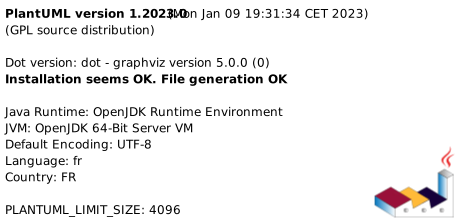
The current version of PlantUML embedded in PP is:
ditaa.jar is integrated in PP. ditaa is distributed under the GNU General Public License version 2.0 (GPLv2). See http://sourceforge.net/projects/ditaa/.
Your feedback and contributions are welcome. You can contact me at http://cdelord.fr
This site is powered by LuaX, bang, ypp, cdsoft.css and Pandoc.
Mirrors: cdelord.fr – christophe.delord.free.fr – cdsoft.codeberg.page