
👨💻 about me home CV/Resume News 🖊️ Contact Codeberg Github LinkedIn 🏆 Best of LuaX (tools) pub bang ypp panda lsvg ldc req yreq Fizzbuzz Calculadoira TPG picfg Belenos (intro) dnsfilter badges 🔀 Git Repos
Made in Europe
Important
ypp is now part of LuaX (https://codeberg.org/cdsoft/luax).
This consolidation simplifies maintenance and updates, and makes deploying LuaX, Bang, and ypp more consistent.
The legacy ypp repository is now deprecated and will no longer receive updates.
ypp is yet another preprocessor. It’s an attempt to
merge UPP and Panda. It acts as a
generic text preprocessor as UPP and comes with macros
reimplementing most of the Panda
functionalities (i.e. Panda facilities not
restricted to Pandoc but also available to
softwares like Typst).
Ypp is a minimalist and generic text preprocessor using Lua macros.
It provides several interesting features:
It is strongly recommended to build Ypp from source, as this is the only reliable way to install the exact version you need.
However, if you do require precompiled binaries, this page offers a selection for various platforms: https://cdelord.fr/pub.
Note that the bin directory contains prebuilt ypp
scripts that can run with a Lua or LuaX interpreter.
Ypp is a free and open source software. But it has a cost. It takes time to develop, maintain and support.
To help Ypp remain free, open source and supported, users are cordially invited to contribute financially to its development.


Feel free to promote Ypp!
ypp is an Open source software. Anybody can contribute on Codeberg to:
Ypp is written in LuaX. It can be compiled with Ninja, LuaX and bang.
$ git clone https://codeberg.org/cdsoft/luax
$ cd luax
$ ./bootstrap.sh
$ ninja install # install LuaX to ~/.local/bin$ git clone https://codeberg.org/cdsoft/bang
$ cd bang
$ ./boot.lua
$ ninja install # build bang with Ninja and install it to ~/.local/bin$ git clone https://codeberg.org/cdsoft/ypp
$ cd ypp
$ bang
$ ninja install # build ypp with Ninja and install it to ~/.local/binninja install installs ypp in
~/.local/bin. The PREFIX variable can be
defined to install ypp to a different directory
(e.g. PREFIX=/usr ninja install to install ypp
in /usr/bin).
$ make testUsage: ypp [-h] [-v] [-a] [-l script] [-e statement] [-D definition]
[-p path] [-o file] [-t {svg,pdf,png}] [--MT target]
[--MF name] [--MD] [--img path] [--meta path] [-m char] [-s]
[<input>] ...
ypp
Yet a PreProcessor
Arguments:
input Input file
Options:
-h, --help Show this help message and exit.
-v Show ypp version
-a Force colorization using ANSI codes
-l script Execute a Lua script
-e statement Execute a Lua statement
-D definition Define a Lua variable (-DNAME="string")
-p path Add a path to package.path
-o file Redirect the output to 'file'
-t {svg,pdf,png} Set the default format of generated images
--MT target Add `target` to the target list (implies `--MD`)
--MF name Set the dependency file name (implies `--MD`)
--MD Generate a dependency file
--img path Set the path for generated images
--meta path Set the path for generated meta image files
-m char Set the default macro character (default: '@')
-s Add a blank line separator between all input files
For more information, see https://codeberg.org/cdsoft/yppNote for Windows users: since Windows does not
support shebangs, ypp shall be explicitly launched with
luax (e.g.: luax ypp). If ypp is
not found, it is searched in the installation directory of
luax or in $PATH.
| Option | Description |
|---|---|
-v |
Prints ypp version |
-a |
Forces message colorization even is not writing to a terminal |
-l module |
Loads a module or an external Lua script with require,
the module is stored in the global variable module |
-l name=module |
Loads a module or an external Lua script, the module is stored in
the global variable name |
-l _=module |
Loads a module or an external Lua script, the module is not stored in a global variable |
-e stat |
Executes a Lua statement stat in the ypp Lua
interpreter |
-D name=val |
Defines a Lua variable (shortcut for
-e 'name="val"') |
p path |
Adds a search path to package.path |
-o file |
Redirects the output to file instead of the standard
output |
-t {svg,pdf,png} |
Sets the default format of generated images |
--MT target |
Adds target to the target list (implies
--MD) |
--MF name |
Sets the dependency file name (implies --MD) |
--MD |
Generates a dependency file |
--img path |
Sets the path for generated images |
--meta path |
Sets the path for generated meta image files |
-m char |
Sets the default macro character (default: ‘@’) |
-s |
Separate files with a blank line |
Lua expressions and chunks are embedded in the document to process.
Expressions are introduced by @ and chunks by
@@. Several syntaxes are provided.
The first syntax is more generic and can execute any kind of Lua expression or chunk:
@(Lua expression) or
@[===[ Lua expression ]===]@@(Lua chunk) or
@@[===[ Lua chunk ]===]The second one can be used to read a variable or execute a Lua function with a subset of the Lua grammar:
@ident: get the value of ident (which can
be a field of a table. E.g. @math.pi)@func(...), @func{...},
@@func(...), @@func{...}@func[===[ ... ]===] or
@@func[===[ ... ]===]The expression grammar is:
expression ::= <identifier> expr_cont

call_cont ::= '(' well parenthesized substring ')' expr_cont
            | '{' well bracketed substring '}' expr_cont
            | <single quoted string> expr_cont
            | <double quoted string> expr_cont
            | <long string> expr_cont

expr_cont ::= call_cont
            | '[' well bracketed substring ']' expr_cont
            | '.' expression
            | ':' <identifier> call_cont
            | <empty string>
And the third one is an assignment to Lua variables:
@@var = ...The assignment grammar is:
assignment ::= <identifier> ( '.' <identifier>
                            | '[' well bracketed expression ']'
                            )*
               '='
               ( <number>
               | 'true' | 'false'
               | '(' well parenthesized substring ')'
               | '{' well bracketed substring '}'
               | <single quoted string>
               | <double quoted string>
               | <long string>
               | expression
               )
Note: the number of equal signs in long strings is variable, as in Lua long strings
The Lua code can be delimited with parentheses or long brackets. The code delimited with parentheses shall only contain well-balanced parentheses. The long bracket delimiters shall have the same number of equal signs (which can be null), similarly to Lua literal strings
A macro is just a Lua function. Some macros are predefined by
ypp. New macros can be defined by loading Lua scripts
(options -l and -e) or embedded as Lua
chunks.
Expression and chunks can return values. These values are formatted according to their types:
__tostring method from a custom metatable: if the value
has a __tostring metamethod, it is used to format the
value__tostring metamethod): items are
concatenated (one line per item)tostring
function.For documentation purpose, ypp macros can be disabled with the
q macro:
@q[[
Here, @ has no special meaning.
]]The user's home is @(os.getenv "HOME").
$\sum_{i=0}^100 = @(F.range(100):sum())$@@[[
sum = 0
for i = 1, 100 do
sum = sum + i
end
]]
$\sum_{i=0}^100 = @sum$yppypp(s): apply the ypp preprocessor to a
string.ypp.input_file(): return the name of the current input
file.ypp.input_path(): return the path of the current input
file.ypp.input_file(n): return the name of the nth input
file in the current include stack.ypp.input_path(n): return the path of the nth input
file in the current include stack.ypp.output_file: name of the output file.ypp.find_file(filename): return the full path name of
filename that can be in the current input file directory or
in the current directory.ypp.read_file(filename): return the content of the file
filename and adds this file to the dependency file.ypp.macro(c): use the character c to start
Lua expressions instead of "@" (and cc instead
of "@@").atexitatexit(func): execute func when the whole
output is computed, before actually writing the output.commentcomment(...): returns an empty string (useful for
commenting some text)E.g.:
@comment [===[
This paragraph is a comment
and is not part of the output document.
]===]convertconvert(s, [opts]): convert the string s
from the format opts.from to the format
opts.to and shifts the header levels by
opts.shift.This function requires a Pandoc Lua interpreter. The conversion is made by Pandoc itself.
The opts parameter is optional. By default Pandoc
converts documents from and to Markdown and the header level is not
modified.
The convert macro can also be called as a curried
function (arguments can be swapped). E.g.:
@convert {from="csv"} (script.python [===[
# python script that produces a CSV document
]===])
Notice that convert can be implicitely called by
include or script by giving the appropriate
options. E.g.:
@script.python {from="csv"} [===[
# python script that produces a CSV document
]===]deferdefer(func, ...): emit a unique tag that will later be
replaced by the result of func(...) if func is
callable.defer(table, ...): emit a unique tag that will later be
replaced by the concatenation of table (one item per
line).E.g.:
@@ N = 0
total = @defer(function() return N end) (should be "2")
...
@@(N = N+1)
@@(N = N+1)docdoc(filename, [opts]): extract documentation
fragments from the file filename (all fragments are
concatenated).
opts.pattern is the Lua pattern used to identify the
documentation fragments. The default pattern is
@@@(.-)@@@.opts.from is the format of the documentation fragments
(e.g. "markdown", "rst", …). The default
format is Markdown.opts.to is the destination format of the documentation
(e.g. "markdown", "rst", …). The default
format is Markdown.opts.shift is the offset applied to the header levels.
The default offset is 0.opts.code extract code (i.e. everything but
documentation fragments) in code blocks. The code language is given by
the filename (if opts.code==true) or by
opts.code if it is a string.opts.hide is a Lua pattern used to identify portions of
documentations or code to exclude.The doc macro can also be called as a curried function
(arguments can be swapped). E.g.:
@doc "file.c" {pattern="///(.-)///"}filef = file(name): return a file object that can be used
to create files incrementally. Files are only saved once ypp
succeedf(s): add s to the filef:ypp(s): preprocess and add s to the
fileimageimage(render, ext)(source): use the command
render to produce an image from the source
source with the format ext
("svg", "png" or "pdf").
image returns the name of the image (e.g. to point to the
image once deployed) and the actual file path (e.g. to embed the image
in the final document).The render parameter is a string that defines the
command to execute to generate the image. It contains some
parameters:
%i is replaced by the name of the input document
(temporary file containing source).%o is replaced by the name of the output image file
(generated from a hash of source).Images are generated in a directory given by:
--img optionYPP_IMG if it is defined-o option
is givenimg directory in the current directoryIf source starts with a @
(e.g. "@filename") then the actual image source is read
from the file filename.
The image link in the output document may have to be different than
the actual path in the file system. This happens when the documents are
not generated in the same path than the source document. Brackets can be
used to specify the part of the path that belongs to the generated image
but not to the link in the output document in YPP_IMG. E.g.
if YPP_IMG=[prefix]path then images will be generated in
prefix/path and the link used in the output document will
be path.
The file format (extension) must be in render, after the
%o tag (e.g.: %o.png).
To avoid useless regenerations, a .meta file is created
in the same directory than the image. This file contains image
information (source of the image, ypp parameters…). The image is
regenerated only if this information changes. The --meta
option can be used to save meta files in a different directory.
If the program requires a specific input file extension, it can be
specified in render, after the %i tag (e.g.:
%i.xyz).
Some render commands are predefined. For each render X
(which produces images in the default format) there are 3 other render
commands X.svg, X.png and X.pdf
which explicitely specify the image format. They can be used similaryly
to image: X(source).
An optional table can be given before source to set some
options:
X {name="output_name"} (source) renders
source and save the image to a file named
output_name. This can help distributing documents with user
friendly image names.
X {pp=func} (source) renders
func(source) instead of source. E.g.: if
func is ypp then source is
preprocessed by ypp before being rendered.
| Image engine | ypp function | Example |
|---|---|---|
| Asymptote | asy |
image.asy(source) |
| Blockdiag | actdiag |
image.actdiag(source) |
| Blockdiag | blockdiag |
image.blockdiag(source) |
| Blockdiag | nwdiag |
image.nwdiag(source) |
| Blockdiag | packetdiag |
image.packetdiag(source) |
| Blockdiag | rackdiag |
image.rackdiag(source) |
| Blockdiag | seqdiag |
image.seqdiag(source) |
| Graphviz | circo |
image.circo(source) |
| Graphviz | dot |
image.dot(source) |
| Graphviz | fdp |
image.fdp(source) |
| Graphviz | neato |
image.neato(source) |
| Graphviz | osage |
image.osage(source) |
| Graphviz | patchwork |
image.patchwork(source) |
| Graphviz | sfdp |
image.sfdp(source) |
| Graphviz | twopi |
image.twopi(source) |
| Mermaid | mmdc |
image.mmdc(source) |
| PlantUML | plantuml |
image.plantuml(source) |
| ditaa | ditaa |
image.ditaa(source) |
| gnuplot | gnuplot |
image.gnuplot(source) |
| lsvg | lsvg |
image.lsvg(source) |
| octave | octave |
image.octave(source) |
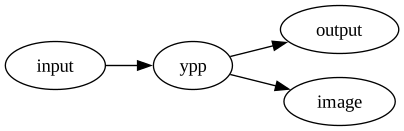
Example:
is rendered as
includeinclude(filename, [opts]): include the file
filename.
opts.pattern is the Lua pattern used to identify the
part of the file to include. If the pattern is not given, the whole file
is included.opts.exclude is the Lua pattern used to identify parts
of the file to exclude. If the pattern is not given, the whole file is
included.opts.from is the format of the input file
(e.g. "markdown", "rst", …). The default
format is Markdown.opts.to is the destination format
(e.g. "markdown", "rst", …). The default
format is Markdown.opts.shift is the offset applied to the header levels.
The default offset is 0.include.raw(filename, [opts]): like
include but the content of the file is not preprocessed
with ypp.
The include macro can also be called as a curried
function (arguments can be swapped). E.g.:
@include "file.csv" {from="csv"}
@include {from="csv"} "file.csv"qq(source): return source unpreprocessed.
q is used to avoid macro execution in a portion of
text.scriptscript(cmd)(source): execute cmd to
interpret source. source is first saved to a
temporary file which name is added to the command cmd. If
cmd contains %s then %s is
replaces by the temporary script name. Otherwise the script name is
appended to the command. An explicit file extension can be given after
%s for languages that require specific file extensions
(e.g. %s.fs for F#).script also predefines shortcuts for some popular
languages:
script.bash(source): run a script with bashscript.bat(source): run a script with
command (DOS/Windows)script.cmd(source): run a script with cmd
(DOS/Windows)script.lua(source): run a script with Luascript.python(source): run a script with Pythonscript.sh(source): run a script with shscript.zsh(source): run a script with zshExample:
$\sum_{i=0}^100 = @script.python "print(sum(range(101)))"$is rendered as
$\sum_{i=0}^100 = 5050$whenwhen(cond)(text): emit text only if
cond is true.E.g.:
@when(lang=="en")
[===[
The current language is English.
]===]ypp is written in Lua and LuaX. All Lua and LuaX libraries are available to ypp.
LuaX is a Lua interpreter and REPL based on Lua 5.4, augmented with some useful packages.
LuaX comes with a standard Lua interpreter and provides some libraries (embedded in a single executable, no external dependency required). Here are some LuaX modules that can be useful in ypp documents:
More information here: https://codeberg.org/cdsoft/luax
Ypp is free software: you can redistribute it and/or modify
it under the terms of the GNU General Public License as published by
the Free Software Foundation, either version 3 of the License, or
(at your option) any later version.

Ypp is distributed in the hope that it will be useful,
but WITHOUT ANY WARRANTY; without even the implied warranty of
MERCHANTABILITY or FITNESS FOR A PARTICULAR PURPOSE.  See the
GNU General Public License for more details.

You should have received a copy of the GNU General Public License
along with ypp.  If not, see <https://www.gnu.org/licenses/>.

For further information about ypp you can visit
https://codeberg.org/cdsoft/yppYour feedback and contributions are welcome. You can contact me at CDSoft.
This site is powered by LuaX, bang, ypp, cdsoft.css and Pandoc.
Mirrors: cdelord.fr – christophe.delord.free.fr – cdsoft.codeberg.page